
Tax reviews, from wherever you are.
Taxpartna puts the whole review in your hand: the flags, the numbers and the source documents behind them. On your phone, your iPad or your laptop, at the office or nowhere near it.
Watch it on the iPhone DuoTax reviews, unfolded. Here is Taxpartna on the new iPhone Duo.
Fold it open and the review is ready: what agreed, what came from a single source, and what does not match. The iPhone Duo is the newest way to see it, but it works the same on any phone, tablet or computer.
One review, on every screen you own.
Taxpartna runs in the browser, so there is nothing to install. Start on the desktop, check in from your phone and finish on the iPad.
Foldables
Open it up and the review fills the screen, like on the new iPhone Duo.
Phones
Check where a review is up to, see the flags and open the evidence with your thumb.
iPad and tablets
The most comfortable way to read a full review away from your desk.
Laptops
Work through the whole file from a client meeting, a hotel or home.
Desktop
The same review at the office, picked up exactly where you left it.
Review in the gaps of your day.
Reviews used to wait until you were back at your desk with the file open. Now they can happen wherever you have a few spare minutes.
In the airport lounge
The flight is delayed. Clear two reviews before boarding instead of carrying them home in your head.
At the park
Kids at footy training? Look over the flagged items on your phone and leave the detail for Monday.
On the commute
Read the review summary on the train so you walk in already knowing which files need a conversation.
Between client meetings
Twenty minutes in the car park is enough to check the movements and the evidence behind them.
At a client's office
Answer the question on the spot by opening the source document, rather than promising to get back to them.
At home, after hours
Peak season runs late. Review on the couch with an iPad instead of logging back into the office.
The workpapers come with you.
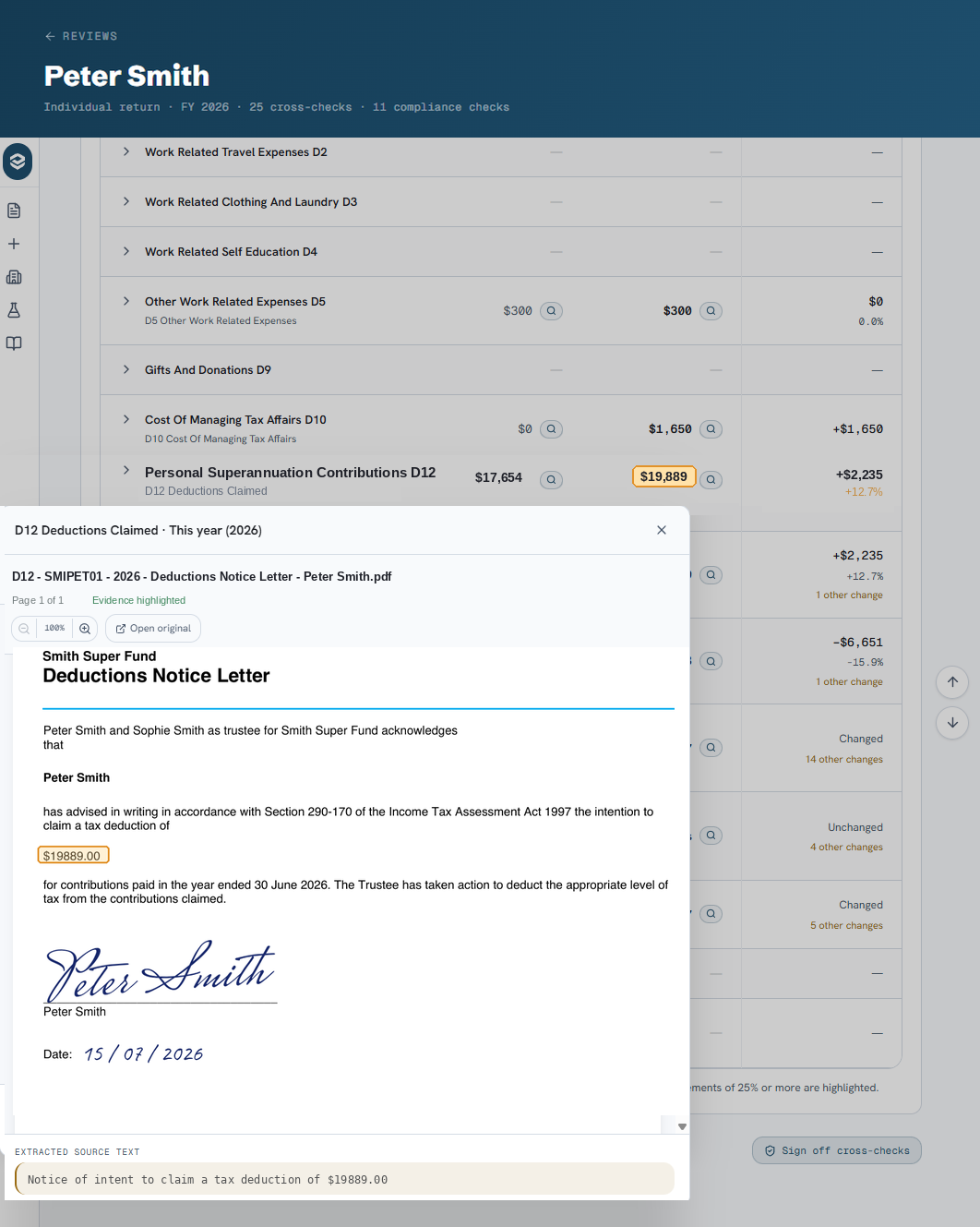
You do not need the file in front of you to trust a number. Tap the magnifier next to any amount and Taxpartna opens the source document at the right page, with the figure highlighted.
- Open the exact page the number came from, not the whole bundle.
- See the amount highlighted, with the extracted source text underneath.
- Compare this year with last year and see the movement at a glance.
- Open the original document if you want to read around it.
From the office to your pocket.
Your team uploads the file
Workpapers, financial statements and the return go into Taxpartna from the office, as they do today.
Taxpartna runs the checks
The automated checks and cross-checks run across every document in the file, usually in minutes.
You get an email when it is ready
Open the link on whatever device you have with you. There is nothing to install.
You review from wherever you are
See what agreed, what needs a look and what is a discrepancy, then open the evidence behind any number.
The reviewer is no longer the bottleneck.
No review bottleneck
Files stop waiting for the reviewer to be back at their desk. The review travels with you.
No remote desktop
It runs in the browser. No logging into the file server or hunting through folders on a small screen.
Evidence in one tap
Every flagged number links back to the page it came from, with the amount highlighted.
Faster sign-off
Use the small gaps in the day. The time adds up across a season of reviews.